Scalable, secure, static web sites in AWS

Hosting web content has a mainstay of AWS for many years. From running your own Virtual Machine, with your favourite web software, to load balancing web traffic, DNS from Route53 and CDN from CloudFront, it’s been one of the world’s preferred ways to publish content for over a decade.

But these days, it’s the Serverless suite of services that help make this much cheaper, faster, more scalable, and repeatable. In this article, we’ll show how we can host a vast number of websites. We’ll also set a series of security features to try to get as secure and available as possible, even though we’ll be allowing anonymous access.

In a future post, we’ll dive through setting up a complete CI/CD pipeline for the content of your websites, with Production and non-production URLs for workflow review and acceptance.

High Level Features

  1. No application servers to manage/patch/scale
  2. Highly scalable
  3. Globally available (cached)
  4. IPv4 and IPv6 (dual-stack)
  5. HTTP/2 (request multiplexing, and compressed request headers)
  6. Brotli compression, alongside gzip/deflate
  7. TLS 1.2 minimum; strong rating on SSLLabs.com
  8. Modern security headers: strong rating on securityheaders.com

Basic Architecture

The basic architecture of the content is:

  • An S3 bucket to host our S3 Access Logs (from the below content bucket) and the CloudFront Access Logs we will be making
  • An S3 Bucket to host the file (object) content
  • A CloudFront distribution, with an Origin Access Identity to securely fetch content from S3.
  • A TLS certificate, issued from Amazon Certificate Manager with DNS validation
  • DNS in Route53 (not strictly necessary, but it makes things easier if we have control of our own domain immediately, and we can handle CloudFront at the APEX of a DNS domain (ie, foo.com) with ALIAS records)

While there is a lot to configure here there are no Servers to administer, per sé. This means the scaling, OS patching, and all other maintenance activities are managed – so we can get on with the content.

A Canonical URL

It is strongly recommended to have one hostname for your website. While you can have multiple names in a TLS certificate and serve the same content, you’ll get down-weighted in search engines for doing so, and it’s confusing to users.

In particular, you need to decide if the URL your users should get your content from is www.example.com, or just example.com. Choose one, and stick to it; the other should be a redirect if you need to (as a separate, almost empty, website). Indeed, there’s a CloudFront Function or Lambda@edge function you can write to do your redirects.

Don’t be tempted to use an S3 Bucket for your web redirections, as there’s a limit on the number of S3 Buckets you can have, and you can’t customise the TLS certificate or TLS profile (protocols, ciphers) on S3 website endpoints directly.

S3 Logging Bucket

This is the destination of all our logs. The key element is the automated retention (S3 lifecycle) policy – we want logs, but we don’t want them forever! Some keys points:

  • S3 Versioning enabled
  • S3 Lifecycle policy, delete current objects after 365 days, and previous revisions after 7 days (just in case we have to undelete).
  • Default encryption, Amazon S3 master-key (SSE-S3)
  • Ironically, probably no server access logging for this Bucket; otherwise if we log server access to the same bucket, we end up with an infinite event trigger loop
  • Permissions: Block Public Access
  • Object ownership: Bucket Owner preferred
  • Permit CloudFront to log, using the canonical ID shown here
  • Permit S3 logging for the Log Delivery permission

S3 Content Bucket

Again we want to Block Public Access. While that may sound counter-intuitive for a public-facing anonymously accessible website, we do not want external visitors poking around in our S3 Bucket directly – they have to go via the CloudFront Distribution.

S3 does have a (legacy, IMHO) website hosting option, but it hasn’t traditionally given you access to have a custom TLS certificate with your own hostname, nor permitted you to restrict various compression and TLS options – that’s what CloudFront lets us customise.

The basic configuration of the Content S3 Bucket is:

  • S3 Versioning enabled (hey, it’s pretty much a standard pattern)
  • S3 Lifecycle Policy, to only delete Previous revisions after a period we’d use for undelete (7 days)
  • Default encryption, Amazon S3 master-key (SSE-S3)
  • Access logs sent to the above Logging Bucket, with a prefix of /S3/content-bucket-name/. Note to include the trailing slash in the prefix name, otherwise, you’ll have a horrible mess of object names
  • Permissions: Block Public Access (CloudFront Origin ID will take care of this)
  • We’ll come back later for the Bucket Policy…

ACM Certificate

The next component we need to start with is a TLS Certificate; we’ll need to be already available when we set up a CloudFront distribution.

ACM is pretty simple: tell it the name (or names) you want on a certificate, and then ensure the validation steps happen.

My preference is DNS validation: once the secret is stored in DNS, then subsequent re-issues of the certificate get automatically approved, and then automatically deployed.

Ideally, your website will have one, and only one, authoritative (canonical) DNS hostname. And for that service, you may want to have just one name in the certificate. It’s up to you if you want the name to be “www.domain.com”, or just “domain.com”. I would avoid having certificates with too many alternate names, as any one of those names having its DNS secret removed will block the re-issuance of your certificate.

Lambda@Edge

There are two major functions we’ll use Lambda@Edge: one to transform some incoming requests, and one to inject some additional HTTP headers into the response.

All Lambda@Edge functions need to be created in us-east-1; and the CloudFront service needs access to invoke them.

Handling the default document in sub-prefixes

CloudFront as a CDN has the concept of a default object, a file name that can be fetched when no filename is supplied. Historically (as in, before IIS existed), this was index.html (if you’re wondering index.htm came about, then you probably don’t recall Microsoft DOS and Windows with its 8.3 filename limits). However, the configuration setting only applies to one request URL: the root object, or “/”. It does not cater for “subdirectories” or folders, which is often not what’s needed; in which case, when a path of “/foo/”. is requested, then we want to update the request that will hit the origin (S3) to “/foo/index.html”., and mask the fact we’ve done this.

As of May 2021, CloudFront also has a new code execution service, CloudFront Functions. This would be suitable for this purpose as well.

Here’s a simple Node.JS to achieve this:

const path = require('path')
exports.handler = (event, context, callback) => {
const { request } = event.Records[0].cf
const url = request.uri;
const extension = path.extname(url);
if (extension && extension.length > 0){
return callback(null, request);
}
const last_character = url.slice(-1);
if (last_character === "/"){
return callback(null, request);
}
const new_url = ${url}/;
console.log(Rewriting ${url} to ${new_url}...);
const redirect = {
status: '301',
statusDescription: 'Moved Permanently',
headers: {
location: [{ key: 'Location', value: new_url}],
},
};
return callback(null, redirect);

};

Injecting HTTP Security Headers

The second function we will want is to inject additional HTTP headers to help web clients (browsers) to enforce stricter security. There’s a set of headers that do this, some of which need customising to your site and code:

'use strict';
exports.handler = (event, context, callback) => {
function add(h, k, v) {
h[k.toLowerCase()] = [ { key: k, value: v } ];
}
const response = event.Records[0].cf.response;
const requestUri = event.Records[0].cf.request.uri;
const headers = response.headers;
add(headers, 'Strict-Transport-Security', "max-age=31536000; includeSubdomains; preload");
add(headers, 'Content-Security-Policy', "default-src 'self'; img-src 'self' data: ; script-src 'self' 'unsafe-inline' 'unsafe-eval' ; style-src 'self' 'unsafe-inline'; object-src 'none'; frame-src 'self' ; connect-src 'self' ; frame-ancestors 'none' ; font-src 'self'; base-uri 'self'; manifest-src 'self'; prefetch-src 'self' ; form-action 'self' ;");
add(headers, 'X-Content-Type-Options', "nosniff") ;
add(headers, 'X-Frame-Options', "DENY") ;
add(headers, 'Referrer-Policy', "same-origin") ;
add(headers, 'Expect-CT', "enforce, max-age=7257600") ;
add(headers, 'Permissions-Policy', "geolocation=(), midi=(), notifications=(), push=(), sync-xhr=(self), microphone=(), camera=(), magnetometer=(), gyroscope=(), speaker=(), vibrate=(), fullscreen=(), payment=(), autoplay=(self)");
delete headers['server'];
if (requestUri.startsWith('/assets/')) {
add(headers, 'Cache-Control', 'max-age=15552000');
} else if (requestUri.endsWith(".jpg")) {
add(headers, 'Cache-Control', 'max-age=1209600');
} else if (requestUri.endsWith('.html')) {
add(headers, 'Cache-Control', 'max-age=43200');
}
callback(null, response);
};

The exact headers that are recommended changeover time, as the state of capability in the commonly deployed (and updated) browsers change.

The most important header is the HSTS, or Hypertext Strict Transport Security, which informs clients that your service on this hostname should always (for the time period specified) be considered HTTPS only.

Next on my list of security headers is the Permissions Policy, formerly the Feature Policy. This administratively disables some capability that browsers can surface to web applications, such as the ability to fetch fine-grained location or use a device’s camera. Typically we don’t want any of this, and we probably wouldn’t want any introduced JavaScript (possibly coming from a 3rd party site) to try this.

The most specific header, which truly needs customising to your site’s content and structure, is the Content Security Policy, or CSP. This permits you to express in great detail the permitted sources for content to be loaded from, as well as where your content can be embedded into (as iframe content in another page), or what it can embed (as iframe content within your page).

As of May 2021, CloudFront also has a new code execution service, CloudFront Functions. However, this would have to be executed every time an object is served to a client, as at this time, CloudFront Functions can not hook into the request life cycle at the Origin Response phase. The difference is important: these static headers can be executed once and attached to a cached object, and then served an infinite number of times.

CloudFront Origin Identity & S3 Content Bucket Policy

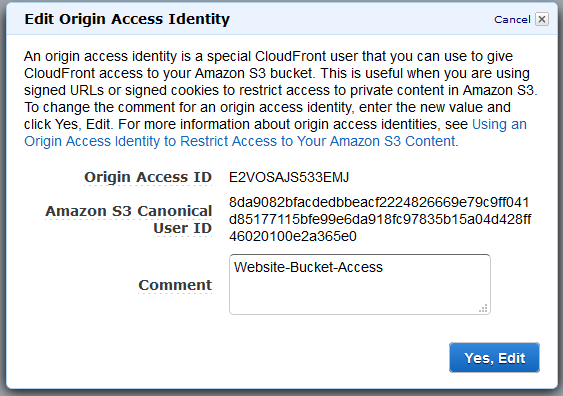
An Origin Access Identity is a way to permit CloudFront edge locations to make authenticated calls against an S3 Bucket, using credentials that are fully managed, dynamic, and secure.

An Origin Access Identity has one attribute, a “comment”., which we’ll call “Website-Bucket-Access”. In response, we’ll get an ID, as shown here:
We can now go back to the S3 console, and update our Content Bucket with a Policy that permits this ID to be able to Get objects (it only needs Get, not List, Put or anything else).

{
  "Version": "2008-10-17",
  "Id": "PolicyForCloudFrontPrivateContent",
  "Statement": [
    {
      "Sid": "1",
      "Effect": "Allow",
      "Principal": {
"AWS": "arn:aws:iam::cloudfront:user/CloudFront Origin Access Identity E2VOSAJS533EMJ"
    },
    "Action": "s3:GetObject",
    "Resource": "arn:aws:s3:::my-bucket-for-websites/*"
    }
  ]
}

CloudFront Distributions

Each web site requires its own CloudFront distribution, with a unique origin path within our S3 Content Bucket that it will fetch its content from. It will also have a unique Hostname, and a TLS certificate.

In order to facilitate some testing, we’re going to define two Distributions per web site we want: one for Production, and one for Testing. That way we can push content to the first S3 Bucket, ensure that it is correct, and then duplicate this to the second (production) location.

To make this easier, we’re going to use the following prefixes in our Content S3 Bucket:

  • /testing/${sitename}
  • /production/${sitename}

For the two distributions, we’ll create one of test.sitename, and the production one with just the target sitename we’re after.

In this case, we’re using the same AWS account for both the non-production and production URLs; we could also split this into separate AWS accounts (and thus duplicate a separate S3 bucket to hold content, etc). We can also add additional phases: development, testing, UAT, production. One deciding factor is how big a team is working on this: if it is just one individual, two levels (testing, production) is probably enough; if a separate team will review and approve, then you probably need an additional development environment to keep working while a test team reviews the last push.

Here’s the high level configuration of the CloudFront distribution configuration:

  • Enable all locations – we want this to be fast everywhere.
  • Enable HTTP/2 – this compresses the headers in the request, and permits multiplexing of multiple requests over the one TCP connection
  • Enable IPv6 as well as IPv4 – significant traffic silently falls back to IPv4, and the deployment is easy, fast, and doesn’t cost anything. Note that you need to create both an A record in DNS, and an AAAA record (ALIAS in Route53) for this; just ticking the IPv6 option here (or in the template) does not make this work by itself.
  • For the default behaviour, set up an View Request handler for the default document rewrite lambda in US East, and the Security Header injection on Origin Response.
  • Set logging to the S3 log bucket, in a prefix of “CloudFront/${environment}/${sitename}
  • Enable compression
  • Redirect all requests to HTTPS; one day in a few years time this wont be necessary, but for now….
  • Only permit GET and HEAD operations
  • Set the Alternate Domain name to the one in your ACM certificate, and assign the ACM certificate to this distribution

Template the steps

In order to make this as efficient as possible, and support maintenance in a scalable way, we’re going to template these. Lets start with these template ideas:

Shared Templates (only one instantiation)

  • CloudFront Origin Identity – used by all CloudFront distributions to securely access the S3 Bucket holding the content
  • Lambda@Edge Default Document Function, to map prefixes to a default document under each prefix.
  • Lambda CloudFront Invalidate (flush) function (so we can test updates quickly) – very useful with CI/CD pipelines!
  • Logging S3 Bucket
  • Content S3 Bucket

Templates per distribution (per web site)

  • Lambda@Edge Security Headers; with unique values per site, to fit security like a glove around the content
  • ACM certificate
  • CloudFront distribution (depends on the above two)

Download templates

These may need some customisation, but are a reasonable start:

Summary

Now you have a way to deploy a number of web sites, it’s worth looking at the costs, and administration overhead.

Bandwidth is always a cost no matter what the rate is, so optimising your service to reduce the size of downloads is key; not only will cost decrease, but its also going to make your service ever so slightly faster.

Serving images in current-generation formats, such as webp (instead of jpeg) may give an improvement; but you need to be confident that only modern clients are using your service. Of course, if you’re restricting TLS protocols for security requirements, then you probably already have mostly modern clients!

Even if you can’t use contemporary image formats, you can ensure that images are used in the browser at the resolution they are; we’ve seen people take the image they took with their phone at 2 MB and thousands of pixels wide and high, only to implement width and height of 50 pixels! If nothing else, ensure you’re compression of JPEGs is reasonably (you probably have a default of 90%, when 60% may do).

You should now test your public facing services with SSLLabs.com/testssl/, SecurityHeaders.com, and Hardenise.com. You may also want to hook up from browser reporting with report-uri.com as well.

Next steps

In a subsequent post, we’ll look at having Production, UAT and Development copies of our sites, as well as using CodeCommit to store the content, and CodePipeline to check it out into the various environments.
UniFi: Should I wait for the next DreamMachine Pro?

I switched to a 1 Gb/s NBN connection a few months back, but it soon became apparent that the original Unifi Security Gateway (USG) is no match for 1 Gb/s link.

While I love the Wifi access points, the management interface, and the rapid firmware updates, throughput limitations of the USG only became noticeable when the link speed went up. Ubiquity Networks, the manufacturers of the Unifi range, has released faster products – the throughput being the major selling point. And of course, the pricing goes up accordingly.

But in thinking of the current top-of-the-line device, the DreamMachine Pro, it kind of gives me some pause for consideration.

The device has two “WAN links”; one is an RJ45 gigabit Ethernet port, the other is a 10Gb/s SFP slot for a fibre GBIC. I’d love to have a fail-over Internet connection, but the fibre connection isn’t an advantage to me.

Ubiquiti are not selling their LTE fail-over device in Australia. I’d have to drop the 10 Gb/s SFP port back to a vanilla 1 Gb/s RJ34 copper port to plug into an alternate LTE device. But then again, carrier plans for this pattern are expensive.

However, it could be that I have two RJ45 Internet connections; my NBN connection affords me up to 4 ISP connections in the fiber-to-the-premesis that I have available. Now, the upstream link from my CPE to the Point of Interconnect (PoI) may be limited to 1 GB, but having the ability to fail-over to another ISP may be useful. Or I may ant to route traffic by port or Service to a different link (eg, VPN traffic over Link #2, or Web Traffic over Link #2, or perhaps just streaming video from some specific providers over alternate link.).

The Dream Machine also has a built in 8 port switch (EJ45), but none of the ports are Power over Ethernet (POE). After all, the majority of links going in to this are going to be WiFi access points directly, and linking an 8 port PoE switch in here seems a waste. A long tail of customers would find this fills their needs without having additional switches to worry about.

I would also have expected more ports here, given the cost of the device: say 16 ports, even if only half of them were PoE.

The inclusion of Protect for video cameras is a neat idea, but having two local disks to RAID together would be nice. I have shied away form on=premise storage, but for large volumes of video, I still like having the highest bandwidth version not traversing the WAN. So Its great we have one disk option available, but it could be so much more awesome if we just had some local resilience.

Of course, if Japan has residential 2 Gb/sec Internet connection, then would this device still be usable? I’m guessing Australia will max out on 1 Gb/sec for a while…

So, trying to decide if I dive in for the current DreamMachine Pro, or wait until it’s tweaked…..

Integrating McAfee ESM SIEM and CloudTrail

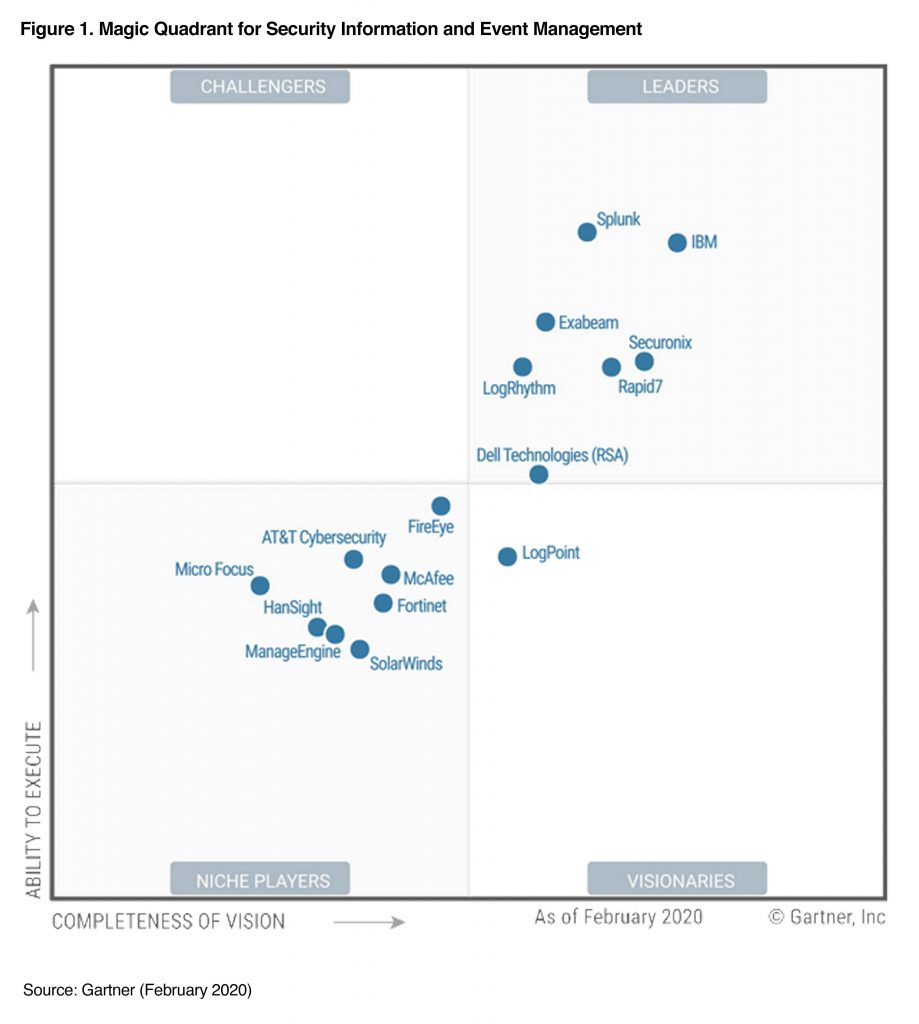
McAfee Enterprise Security Manager (ESM) is a Security Information and Event Management (SIEM) product that helps collect and then correlate events from various data sources (McAfee info).

Gartner rates it in their Magic quadrant, shown here from 2019:

Gartner Magic Quadrant for SIEM, 2019

I was working with a customer recently who wanted to ingest their AWS CloudTrail logs into this product.

McAffee have implemented support for this, using an IAM Access and Secret key, reading from an SQS Queue, and fetching the referenced files from S3.

AWS CloudTrail itself supports sending a notification to the Simple Notification Service for each log file delivered; it is left as an exercise to the customer to plumb the rest together. It’s not hard, and can be put into a CloudFormation template. Here it is: Download the CloudFormation Template.

Lets pull apart the simple architecture that is wrapped up in the above linked template.

Parameters

The parameters to a template are the only items you likely need to customise to your environment.

  1. The S3 Bucket name that you have CloudTrail being deployed in to (from the Trail config)
  2. The SNS Topic name that you have CloudTrail sending file delivery notifications sent to (from the Trail config)
  3. The Name of the new SQS Queue to be made that will catch the notifications, and buffer them for McAfee to then read. You can probably leave this as the default.
  4. The name of the IAM User to be created to permit an off-cloud SIEM to have API credentials. You can probably leave this as McAfeeSIEM.
  5. The Public IPv4 address range that requests will originate for your ESM making its outbound API calls to AWS.
  6. Your AWS Organizations “Organization ID”. Its a string that starts with “o-” that is in the prefix for the files appearing in S3 from CloudTrail.

Inside the template

The resources created in the template are the guts of what gets created on our behalf.

The SQS queue is configured with long polling enabled, to reduce the number of polls being made in case McAfee tries a tight continual loop, but also so that when the queue is already drained, the McAfee will remain connected for up to this duration to immediately get the message to fetch a file.

An SQS Policy is added to the Queue to permit the selected SNS Topic to publish messages to the queue, and then a Subscription to hook these together is defined.

Lastly, an IAM user is created, with a policy that permits access to process messages from the queue (read and delete messages, plus a few other APIs that McAfee documented), as well as access to List the contents of the target bucket, and Get the objects within the defined prefix.

Admin actions after deploying the template

With this CloudFormation stack deployed, go to the IAM console, find the new IAM User (McAfeeSIEM was the default), go to the Credentials tab, and issue an Access key pair. Take care to record the secret key – this is the only time you’ll see this; if you lose it, then start a key rotation to get a fresh Access/Secret key pair.

On McAfee SIEM, insert the access key and secret key into the AWS CloudTrail config. If your SIEM has outbound Internet access (possibly via a proxy) then this should start to fetch messages form the SQS Queue and process files.

You can look for the number of messages in the SQS queue as a help to debug: if the queue is non-zero (and growing) then your SIEM is probably not fetching and clearing its Queue messages.

Evolution of Compute: Physical to Serverless

Unless you’ve been under a rock, you’ve seen the impact that Hyperscale Public Cloud has made on the IT industry. Its invention wasn’t to be a thing, but to be a continually evolving, improving thing.

And while many organisations will use SaaS platforms, those platforms themselves often run atop the IaaS and PaaS platforms of a hyperscale cloud platform.

One person’s SaaS is another person’s IaaS.

Me, James Bromberger

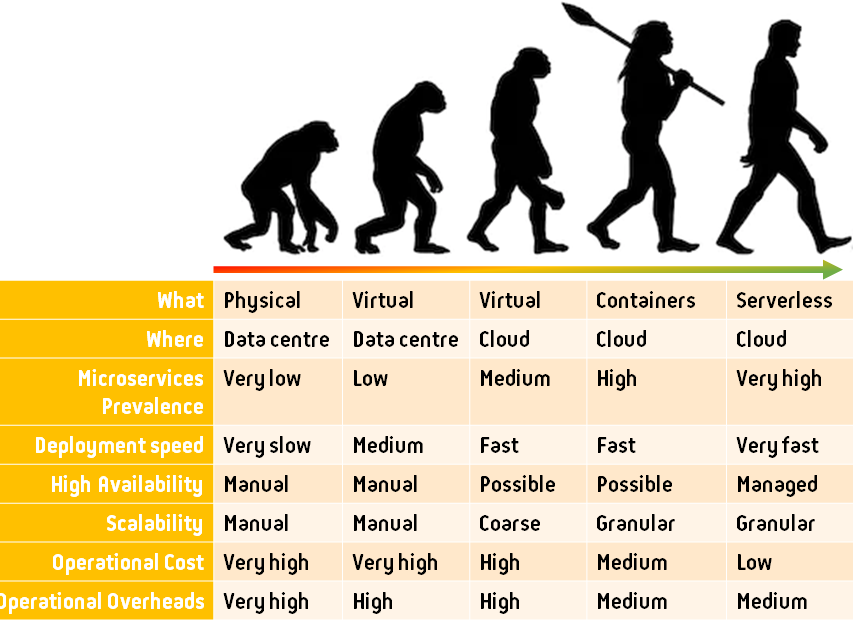
But its worth just checking on the evolution of IT service delivery at a low level, for not everyone who is in the IT industry has seen what that looks like at this time.

Evolution of service delivery from Physical servers to Serverless.

Change is hard. Humans are bad at it. I’ve seen many who evolved from column 1 to column 2, and have felt they are “done”. They aren’t on-board for the next wave of the evolution.

I suffer from this too. But three is a short cut that I can offer: try to jump from where you are now, to as far to the right as you can in one step.

Every one of these phases is a monumental shift in the way that services are delivered, requiring training, and experience. There is an overhead knowledge baggage that engineers take with them, trying to work out what functions the same as before, and what is different. This is taxing, stressful, and unpleasant.

So rather than repeat this process in sequence, over years for each change, my recommendation is to see how far to the right you can jump. Some limitations will crop up that prevent you from leap-frogging all the way to Serverless, but that’s OK. Other services will not be thus constrained.

Well Architected, meet Well Maintained

In 2012, the Well Architected concept was born inside AWS. It is a set of principles that helps lead to success in the Cloud; at that time, that was the AWS EC2 environment. It’s well worth a read if you have not seen it. At this time, its also been adopted my Microsoft for the Azure environment as well.

However, I want to move your attention from Architecture time, to operations time.

If you look at the traditional total life-cycle activities, there’s a lot of time and effort spent learning, adjusting, and implementing supporting technologies that are starting to become invisible in the Serverless world.

Lets look at the operational activities done in a physical environment, and compare that to Serverless. I’ll skip the middle phases of evolution as shown above:

ActivityPhysicalServerless
Physical securityRequiredManaged
Physical installationRequiredManaged
Capacity PlanningRequiredManaged
Network switchingRequiredManaged
Hardware power planningRequiredManaged
Physical coolingRequiredManaged
Hardware procurementRequiredManaged
Hardware firmware updatesRequiredManaged
OS installationRequiredManaged
OS patchingRequiredManaged
OS upgradeRequiredManaged
OS licensingOften RequiredManaged
Runtime selectionRequiredRequired
Runtime minor patchingRequiredManaged
Runtime major version upgradeRequiredRequired
App server selectionRequiredManaged
App server minor patchingRequiredManaged
App server major version upgradeRequiredManaged
Code base maintenanceRequiredRequired
Code base 3rd party library updates (SDKs)RequiredRequired
Network encryption protocol and cipher upgrades (TLS, etc)RequiredRequired

As you can see, a large number of activities that should be done regularly to ensure operational excellence. However, I am yet to see a traditional physical environment, or virtualised on-prem environment that actively does all of the above well.

It’s an easy test: wander into any Java environment, and ask what version of the Java runtime is deployed in production. The typical response is “we updated to Java 8 two years ago“. What that means if “we haven’t touched the exact deployed version of Java for two years“.

Likewise, ask what version of Windows Server is deployed? Anything older than 2016 (even that, with 2019 has been out for nearly 2 years at this time is generous) shows a lack of agility and maintenance.

I challenge those in IT operations to think through the above table and check the last time their service updated each row – post project launch. If its a poor show, the change is your in “support mode”, and not “DevOps Operations”.

So what can be done to help do this maintenance?

Take it away. Stop it. While it can be argued to be important, and interesting, you’re possibly better off spending that effort on the smaller list that remains in a Serverless environment.

Evolution Continues

We can’t see where this evolution will go next. We do see that identity, authentication, authorisation, in-flight encryption, remain key elements to be aware of.

What comes next, I can’t predict. I know many ideas will be thrown about, new or recycled, and some will work, while others will wither and disappear again.

The only constant in life is change.

Heraclitus, b. 565 BC

Buying a house: Electronic Settlement with PEXA

I have spent many years working with Landgate, the state government Department of Land Administration. It’s a well known AWS Case Study, and a platform that is available for other land jurisdictions of the world if they wish to move to it.

One of the integrations that implemented is from/to the Electronic Lodgement Network Operators (ELNOs) to facilitate electronic settlement of property transactions, of which only one is currently active in Australia, Property Exchange Australia, otherwise known as PEXA.

Using PEXA saves settlement agencies, and banks from having to send representatives to a specific location at a specific time with the assortment of cheques, paperwork, and other administration that, should one thing be out of order, causes settlement to be delayed (a costly exercise). Many transactions types have now been mandated to be done via electronic interfaces, one of the first of which in Western Australia was the Discharge of Mortgage.

More than 80% of transactions on the land registry are a property being sold while under mortgage, to someone else who has also taken out a mortgage. This is called DTM; Discharge, Transfer, Mortgage. It’s one of the first transactions that the Advara platform automated the validation of data submitted, saving huge amounts of manual effort.

For a transaction submitted by PEXA, the general turn around time on data validation and transaction approval has now dropped to around 10.8 seconds, down from historical highs of ?30 days.

My Transaction

I was recently purchasing a new property (my home study is occupied by a rather adorable 5 year old girl, IMHO) and armed with the workings of the land titling system, I figured I’d actively watch my settlement transaction.

PEXA has created a user application called PEXA Key, for Android and iPhone, that permits sellers and purchasers to be invited to their property settlement transaction.

All a settlement agents needs to do is collect a mobile phone number and email address from the seller or purchaser, and enter into into the PEXA workspace.

I enquired about this to the real estate agent selling the property, and then in turn my settlement agent, and none of them had heard of this, much less actually done it. So I pushed on, and lo, managed to have them submit my details.

This post shows what happens next.

A Text Message

I received a text message almost immediately – with variables shown where real names were used:

Hi JAMES,

${SETTLEMENT_AGENT} has invited you to download the PEXA Key app to track your settlement. Check your email for more details. Get the app free here key.pexa.com.au/download or exclusively on Google Play or Apple App Store.

Text message I received after my settelment agent registered me in the workspace.

I quickly complied, and was then sent a security activation code.

The app then told me when my settlement had been scheduled for, and any pending tasks that I was responsible for (as it happened, I had already done everything, so it was fine).

This immediately gave me piece of mind, knowing the transaction workspace was set up and pending.

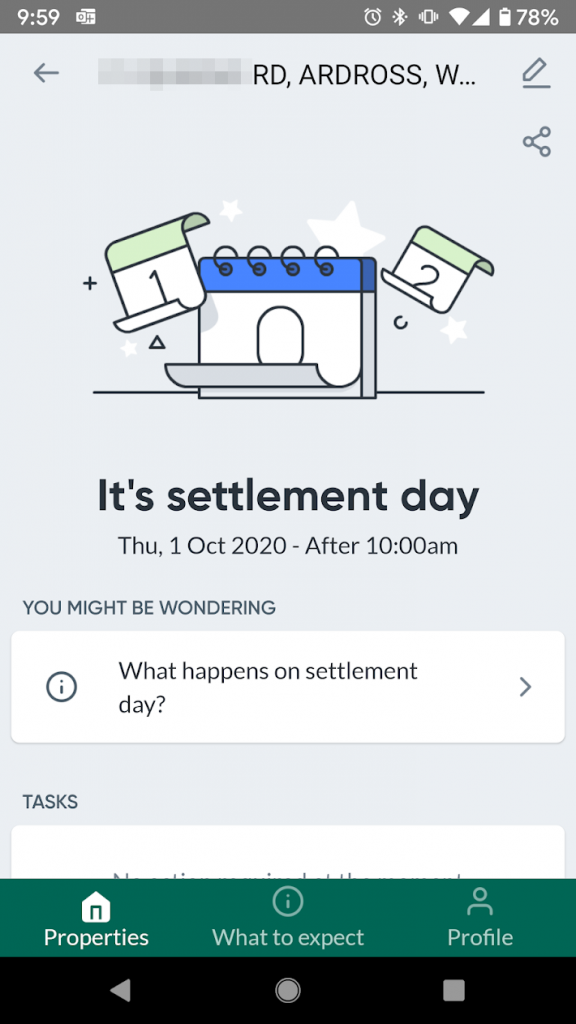
The morning of settlement came around, and I was greeted with this:

It’s settlement day

I nervously checked the application every few minutes to see what would happen next.

And so it begins

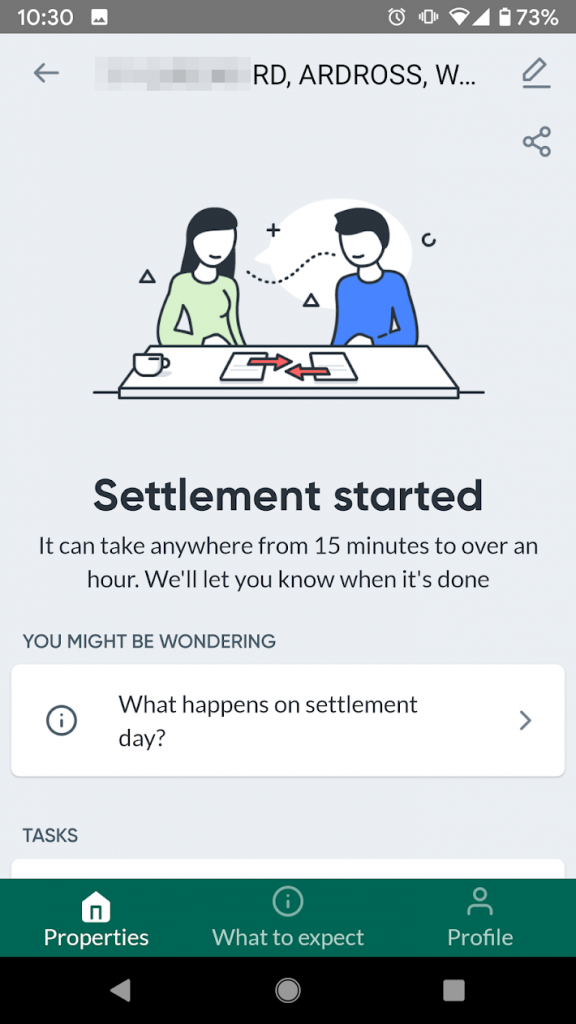
It turned out that the process was initiated around 10:25am or so, after which the PEXA Key application showed:

Settlement started

OK, strap in, the wheels are in motion.

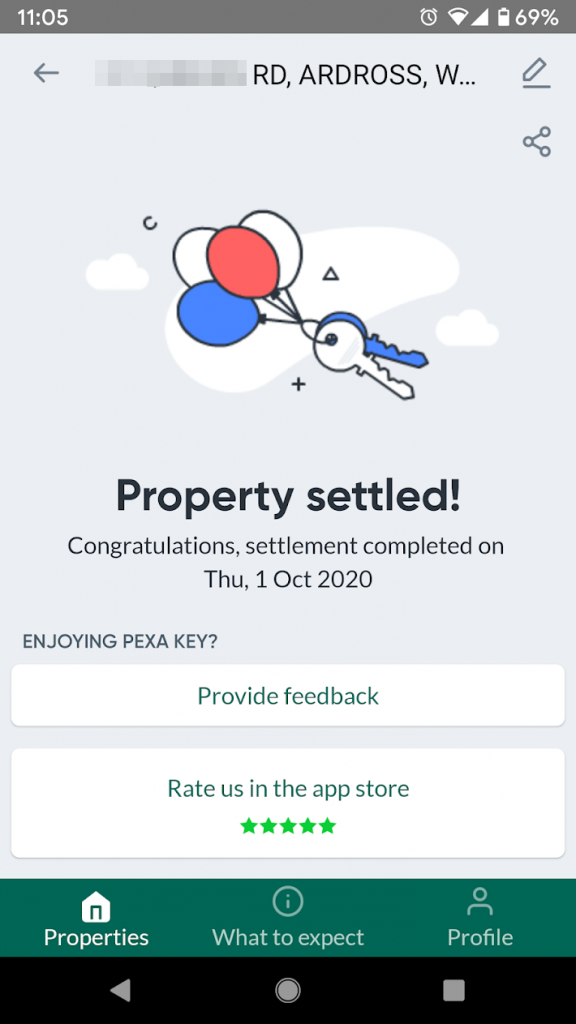
It took around 40 minutes until all was done and dusted, and the final result came through:

Property settled

A few hours later, a new set of house keys were in my hand.

This has to be the most expensive testing I have ever personally done! 😉

The inclusion of the end customer in this process, which just simple visibility, is something that I think should be offered to all parties in the transaction to bring confidence and clarity in the progress or inhibitors in the transaction.

Key to this (pun intended, in two ways) is the swift and efficient recognition of land property transactions. My colleagues and I have worked hard to uplift the validation and security of the land registry system for years, and continue to do so. And as a customer of this system, it worked smoothly.

Some coverage of PEXA Key is here in Cyber Security Magazine (saying this stops an avenue of attack).

I recommend anyone buying or selling property to ask their agent to invite them into the settlement on PEXA using PEXA Key. As many in the real estate industry I have spoken to are unaware of this, you may need to explain this (send them this article’s URL), but its worth it.


Disclosure: I do not work for PEXA, nor have been asked by them (or anyone else) to write this. I share the above to assist anyone else who would like to see their property transactions being processed. While PEXA is a national (Australian) electronic settlement platform, the turn around time from each separate land jurisdiction to validate and register the transaction will vary. Indeed, I’d challenge any of them to beat 10.8 seconds full validation!