Put your CAA in DNS!

There are hundreds of public, trusted* certificate authorities (CAs) in the world. These CAs have had their root CA Certificate published into the Trust Store of many solutions that the world uses. These Trust Stores include widely used web browsers (like the one you’re using now), to the various programming language run times, and individuals operating systems.

A trust store is literally a store of certificates which are deemed trusted. While users can edit their trust store, or make their own, they come with a set that have been selected by your software vendor. Sometimes these are manipulated in the corporate environment to include a company Certificate Authority, or remove specific distrusted authorities.

Over time, some CAs fall into disrepute, and eventually software distributors will issue updates that remove a rouge CA. Of course, issuing an update for systems that the public never apply doesn’t change much in the short term (tip: patch your environments, including the trust store).

Like all x509 certificates the CA root certificates have an expiry, typically over a very long 20+year period, and before expiry, much effort is put into creating a new root Certificate and having it issued distributed and updated in deployed applications.

Legitimate public certificate authorities are required to undertake some mandatory checks when they issue their certificates to their customers. These checks are called the Baseline Requirements, and are governed by the Browser/CA Forum industry body. CAs that are found to be flouting the Baseline Requirements are expelled from the Browser/CA Forum, and subsequently, most software distributions then remove them from their products (sometimes retrospectively via patches as mentioned above).

Being a Certificate Authority has been a lucrative business over the years. In the early days, it was enough to make Mark Shuttleworth a tidy packet with Thawte – enough for him to become a very early Space Tourist, and then start Canonical. With a trusted CA Root certificate widely adopted, a CA can then issue certificates for whatever they wish to charge.

What’s important to note though, is that any certificate in use has no bearing on the strength of encryption or negotiation protocol being used when a client connects to an HTTPS service. The only thing a CA-issued certificate gives you is a reasonably strong validation that the controller of the DNS name you’re connecting to has validate themselves to the CA vetting process.

It doesn’t tell you that the other end of your connection is someone you can TRUST, but you can reasonably TRUST that a given Certificate Authority thinks the entity at the other end of your connection may be the controller of their DNS (in Domain Validated (DV) certificates). Why reasonably? Well what if the controll erof the web site you’re trying to talk to accidentally published their PRIVATE key somewhere; a scammer could then set up a site that may look legitimate, poison some DNS or control a network segment your traffic routes over….

When a CA issues a certificate, it adds a digital signature (typically RSA based) around the originating certificate request. With in the certificate data are the various fields about the subject of the certificate, as well as information about who the issuer is, including a fingerprint (hash) of the issuer’s public certificate.

Previously CAs would issue certificates with an MD5 of their certificate. MD5 was replaced with SHA1, and around 2014, SHA1 was replaced with SHA2-256.

This signature algorithm is effectively the strength of the trust between the issuing CA, and the subjects certificate that you see on a web site. RSA gets very slow as key sizes get larger; today’s services typically use RSA at 2048 bits, which is currently strong enough to be deemed secure, and fast enough not to be a major performance overhead; make that 4096 bits and its another story.

Not only is the RSA algorithm being replaced, but eventually the SHA2-256 will be as well. The replacement for RSA is likely to be Eliptic Curve based, and SHA2-256 will either grow longer (SHA2-384), or to a new algorithm (SHA3-256), or a completely new method.

But back to the hundreds of CAs: you probably only use a small number in your organisation. LetsEncrypt, Amacon, Google, Verisign, GlobalTrust, etc. However, all CAs are seen as equally trusted when presented with a valid signed certificate. What can you do to prevent other CAs from issuing certificates in your (DNS) name?

The answer is simple: the DNS CAA record: Certificate Authority Authorisation. Its a list that says which CA(s) are allowed to issue certificates for your domain. It’s a record in DNS that is looked up by CAs just before they’re about to issue a certificate: if their indicator flag is not found, they don’t issue.

As it is so rarely issued, you can set this DNS record up with an extremely low TTL (say, 60 seconds). If you get the record wrong, or you forget to whitelist a new CA you’re moving to, update the record.

DNS isn’t perfect, but this slight incremental step may help keep public CAs to only issue from the CA’s you’ve made a decision to trust, and for your customers to trust as well.

DNS CAA was defined in 2010, and an IETF RFC in 2014. I worked with AWS Route53 team to have the record type supported in 2015. You can inspect CAA records using the dig command:

dig caa advara.com
; <<>> DiG 9.10.6 <<>> caa advara.com
;; global options: +cmd
;; Got answer:
;; ->>HEADER<<- opcode: QUERY, status: NOERROR, id: 5546
;; flags: qr rd ra; QUERY: 1, ANSWER: 1, AUTHORITY: 0, ADDITIONAL: 0
;; QUESTION SECTION:
;advara.com. IN CAA
;; ANSWER SECTION:
advara.com. 60 IN CAA 0 issue "amazon.com"

Here you can see that advara.com has permitted AWS’s Certificate Manager, with its well known flag of “amazon.com” (and its a 60 second TTL).

You’ll also see that various online services will let you inspect this, including SSLLabs.com, Hardenize.com, and more.

Putting a CAA record in DNS typically costs nothing; its rarely looked up and can easily be changed. It protects you from someone tricking another CA into issuing certificates they think are legitimate; and this has been seen several times (think how valuable a google.com certificate would be ot intercept (MITM) mobile phones, searches, gmail, etc) – and while mis-issuance like this MAy lead to Browser/CA forum expulsion, and eventual client updates to distrust this CA, its far easier to prevent issuance with this simple record.

Of course, DNS Sec would be nice too…

Project & Support versus DevOps and Service teams

The funding model for the majority of the worlds IT projects is fundamentally flawed, and the fall out is, over time, broken systems, lacking security and legacy systems.

It’s pretty easy to see that digital systems are the lifeblood of most organisations today. From banking, stock inventory and tracking, HR systems. And the majority of these critical operations have been deployed as “projects”, and then “migrate to support”. And it’s that “migrate to support” that is the problem.

Support roles are typically over subscribed, and under empowered. It’s a cost saving exercise to minimise the overhead, by taking the more expensive development resources and moving them to a fresh project, while more commodity problem solving labour comes along to triage operational run time issues. However, that support function has no history in the design and architecture, and often either has no access to the development and test environments to continue doing managed change, or is not empowered to do so. The end result is that Support teams use the deployed production features (eg: manually add a user to a standalone system) instead of driving incremental improvements (eg: automatically add a user base don the HR system being updated).

Contrast with a DevOps team, of dynamic size over time. The team that builds & tests & deploys & automates this more complete lifecycle, and stays with the critical line-of-business system, becomes a Service Team. Any changes they need to perform are not applied in production locally, as is often the case with “Support teams”, but in the Development environment. This then should pass automated testing and feedback loops before being promoted to a higher environment. Sounds great, yeah?

Unfortunately, economic realities are the constraint here. Both the customer, and consultancy are trying to minimise cost, not maximise capability. And navigating a procurement and legal team is something that the procurement cycle wants to do as rarely as possible, not on a continuous basis.

Contrast a Service team focus, of variable size over time, containing different capabilities over time. The cost for this team varies over time, based upon the required skill set. The team objective is to make the Best Service they can, and need to drive from metrics: Availability, Latency, Accuracy while meeting strict security requirements.

From the Service team’s perspective, they obviously need remuneration for their time, but also want to take a sense of pride in their work, and a sense of achievement.

A Support Team is not a Service Team, as they don’t have the full Software Lifecycle Management capability and/or Data Lifecycle Management capability. A Service Team should never be one person; that’s one step away from being zero people. A Service Team may look after more than one service, but not so many that they do not have crystal clear focus on any service.

S3 Public Access: Preventable SNAFUs

It’s happened again.

This time it is Facebook who left an Amazon S3 Bucket with publicly (anonymously) accessible data. 540 million breached records.

Previously, Verizon, PicketiNet, GoDaddy, Booz Allen Hamilton, Dow Jones, WWE, Time Warner, Pentagon, Accenture, and more. Large, presumably trusted names.

Let’s start with the truth: objects (files, data) uploaded to S3, with no options set on the bucket or object, are private by default.
Someone has to either set a Bucket Policy to make objects anonymously accessible, or set each object as Public ACL for objects to be shared.

Lets be clear.

These breaches are the result of someone uploading data and setting the acl:public-read, or editing a Bucket’s overriding resource policy to facilittate anonymous public access.

Having S3 accessible via authenticated http(s) is great. Having it available directly via anonymous http(s) is not, but historically that was a valid use case.

This week I have updated a client’s account, that serves a static web site hosted in S3, to have the master “Block Public Access” enabled on their entire AWS account. And I sleep easier. Their service experienced no downtime in the swap, no significant increase in cost, and the CloudFront caching CDN cannot be randomly side-stepped with requests to the S3 bucket.

Serving from S3 is terrible

So when you set an object public it can be fetched from S3 with no authentication. It can also be served over unencrypted HTTP (which is a terrible idea).

When hitting the S3 endpoint, the TLS certificate used matches the S3 endpoint hostname, which is something like s3.ap-southeast-2.amazonaws.com. Now that hostname probably has nothing to do with your business brand name, and something like files.mycompany.com may at least give some indication of affiliation of the data with your brand. But with the S3 endpoint, you have no choice.

Ignoring the unencrypted HTTP; the S3 endpoint TLS configuration for HTTPS is also rather loosely curated, as it is a public, shared endpoint with over a decade of backwards compatibility to deal with. TLS 1.0 is still enabled, which would be a breach of PCI DSS 3.2 (and TLS 1.1 is there too, which IMHO is next to useless).

Its worth noting that there are dual-stack IPv4 and IPv6 endpoints, such as s3.dualstack.ap-southeast-2.amazonaws.com.

So how can we fix this?

CloudFront + Origin Access Identity

CloudFront allows us to select a TLS policy, pre-defined by AWS, but permitting us to restrict available protocols and ciphers. This lets us remove “early crypto” and be TLS 1.2 only.

CloudFront also permits us to use a customer specific name, for SNI enabled clients for no additional cost, or a dedicated IP address (not worth it, IMHO).

Origin Access Identities give CloudFront a rolling API keypair that the service can use to access S3. Your S3 bucket then has a policy permitting this Identity access to the host.

With this access in place, you can then flick the “Block Public Access” setting account-wide, possibly on the bucket first, then the account-wide settings last.

One thing to work out is your use of URLs ending in “/”. Using Lambda@edge, we convert these to a request for “/index.html”. Similaly URL paths that end in “/foo” with no typical suffix get mapped to “/foo/index.html”.

Governance FTW?

So, have you checked if Block Public Access is enabled in your account(s). How about a sweep through right now?

If you’re not sure about this, contact me.

AWS Re:Invent: rest of the releases

Well, that was busy week. It was almost impossible to keep up with the announcements; an overwhelming feeling of something akin to playing Tetris as announcements poured down faster than I could read, understand and appreciate them.

So, having got past day 1, here’s the rest of what I think of what happened next:

DynamoDB Transactions and on-demand

ACID Compliance (atomicity, consistency, isolation, and durability) was always one of the constraints that those new to NoSQL were always trying to understand. For some workloads it was OK to move this validation to the user space (app server) for others, not so much.

On-demand DynamoDB removes the need to set sharding requirements, and let DynamoDB scale (and charge) as required from usage patterns.

CloudWatch Logs Insights

When I first saw this console, it just yelled “This is Sumo Logic” at me.

Outposts

For many years, infrastructure being delivered to a Region was a pre-configured rack with all equipment ready to run. This release effectively shifts the delivery address from “AWS Region” to a customers data centre. It means there is a new channel for delivery of the equipment, and thus produces more scale, and ultimately, drives down cost further.

But who still wants to run data centres? The compliance, maintenance, physical security are all very compelling. Plus, an on-premise deployment has maintenance, and capacity limits that are way lower than the Region.

S3 Glacier Deep Archive

From Glacier with infrequent retrieval, to a deeper retention – Deep Archive requires data retention for half a year, and is a 12 hour restore. But the benefit is a huge price savings: US$1/TB/month (yes, Terabyte). That’s US$0.0009765/GB/month – so about time we changed units of measurement to the TB. Compare to Azure blob storage at US$0.002/GB/month (US$2.048/TB/month) , that’s less than half the cost .

When combined with some sensible data work-flows for backups, you’ll save a ton of money. But the biggest win will be when 3rd party backup solutions can instrument this themselves automatically. For example, the last 7 days of backup may sit on S3 Standard durability, and then get migrated to Glacier for 3 months, and then Deep Glacier after that.

Using the above tiering, lets do a 2 TB full backup once per week, and a 100 GB daily incremental. We’ll take 2.6 TB in S3 Std, then 11 weeks of S3 Glacier at 26 TB, and then 9 months of S3 Glacier Deep Archive for 93.6 TB. Sum total monthly cost is = 2.6 * 1024 * 0.025 + 26 * 1024 * 0.005 + 93.6 * 1 = 66.56 + 133.12 + 93.6 = US$293.28 / month = US$3,519.36/year assuming a one year retention.

If we had kept this all onS3 standard durability, then we would have been looking at US$37,539.84/year.

So, who’s going to make the first move? CommVault? Synology? StoreSimple? Storage Gateway VTL?

Managed Blockchain

Previously AWS had said it didn’t want to run a managed Blockchain service, saying no company should sit at the centre of this, but customer demand wins over this: and now two services filling the space: Blockchain as a Service, and the Quantum ledger database service.

Both of these are interesting to me, and I’ll be speaking with customers to see if they want us to integrate this into their solutions. Neither will replace using a relational database for temporal processing, state, etc. But for point in time authoritative signed data, they look interesting.

Textract

This one requires some testing. I’ve previously looked at Mechanical Turk for doing human-intelligence level OCR, but as a service this may be better. Any process that does text extraction should have a multi pronged approach to ensure accuracy; so perhaps a pass of Tectract, followed by a pass of Mech Turk (or other Humans), and then if there is a conflict/mismatch, flag for management inspection….

Security Hub

This is huge for me, and one I am actively getting my head around before recommending into customer environments. Its also enthused me to get back to AWS Config, which I’d previously discounted on cost.

Security Hub united several AWS security services. Each of these have had their own interface, cross-account capabilities, etc. Of course, for me, and my Public Sector customers, the lack of Macie in Australia is still a consideration here.

AWS Organisational CloudTrails

I’ve been a fan of CloudTrail since I first heard of it. The fact that it could always deliver API logs across-account – to a dedicated security account. without any fear or possibility of it being filtered or edited by the source account was a key enabler in enterprise workloads.

Its developed well since its initial launch, with multi-region support, digests files to detect tampering and more. But with all these options came the possibility of inconsistent deployments across a large fleet of accounts.

And while my perception has always been consistency, its only after circling back that you realise that not everything is consistent, with new AWS accounts being added at different times.

It is only with me starting to play with Config and Security Hub (see above) that these inconsistencies have come to light; and the new solution to this is just in time: Organisation Trails, that apply from the Billing/Organisation account, down to all dependent accounts.

An Organisation trial in a dependent account cannot be deleted or modified. They can log cross-account almost the same previous implementation – with the exception of  a few new Permissions required on the destination S3 Bucket policy.

Lambda Ruby, BYO Runtime, and Firecracker

Firecracker is a strong story, but in the end, having a manage environment for it is worth it if I can do so (ie, if latency, sovereignty, etc can be met). What will be interesting is the opportunity for more eyes to review it’s source code.

FSx (Luster & Windows Fileshare)

Managed file shares sound great, but now there’s confusion between EFS and FSx (and to some degree, Storage Gateway as an NFS and CIFS file share).

And much more

I wont go into detail on the large list of other services; my interest is the vast majority of web, security and DevOps-enabling services that continue to incrementally improve. But what happens next is interesting.

Config revisted

When first launched, I got bill shock form turning Config on with just a few rules. But now its much richer, and easier to understand. As it is one of the security tools feeds across into Security Hub, its forced me to circle back to Config and start re-evaluating some of its rules. Its come a long way, and much of the tooling I have written myself in the past to do cross-account checks, which Config also does, can now feed via Security Hub back to a central (organisatoin-wide) interface for alerting and actioning.

Summary,

With some 50,000 people at re:Invent this year, the pace of innovation continues to put AWS far ahead of its competitors.

AWS CloudFront launches in Perth

I moved back to Perth in 2010, having grown up here, gone to school, University and started my career here. It’s a lovely city, with the metropolitan area sprawling north and south along the blue Indian Ocean for some 50+kms. They says it’s a bit of a Mediterranean climate, normally never going below 0°C, and the heat of summer hitting mid 40°C, but with a fresh westerly coastal breeze appearing most afternoons to cool the place down.

But it is rather remote from other major population centers. The next nearest capital city, Adelaide, is 2,600 kms (1,600 miles) by road. Melbourne is 3,400 kms (2,100 miles) on the road, and Sydney is 3,900 kms (2,400 miles).  It’s a large state, some 2.5 million square kilometers of land, the size of the US Alaska and Texas states combined.

So one thing those in technology are well aware of is latency. Even with fibre to the premises (NBN in Australia), the Round Trip Time to Sydney is around 55ms – which is a similar time to Singapore. Melbourne comes in around 45ms.Latency from Perth to Singapore, Sydney, Melbourne, and New Zealand to Sydney

In 2013 I met with the AWS CloudFront team in Seattle, and was indicating the distances and population size (circa 2 million) in Perth. There’s a lot of metrics that goes in to selecting roll-out locations (Points of Presence) for caching services, with latency, population size, economic prosperity, cost of doing business, customer demand from a direct customer model, and customer demand from an end-consumer model being weighed up.

This week (1st week of January 2018) AWS CloudFront launched in Perth.

This impact on this is that all web sites that people of Perth that use CloudFront will now appear to be faster for cachable content. The latency has dropped from the 45ms (to Melbourne) to around 3ms to 5ms (from a residential NBN FTTP @ 50 Mbit/sec).

Test at 9:30pm from Perth (iiNet NBN).

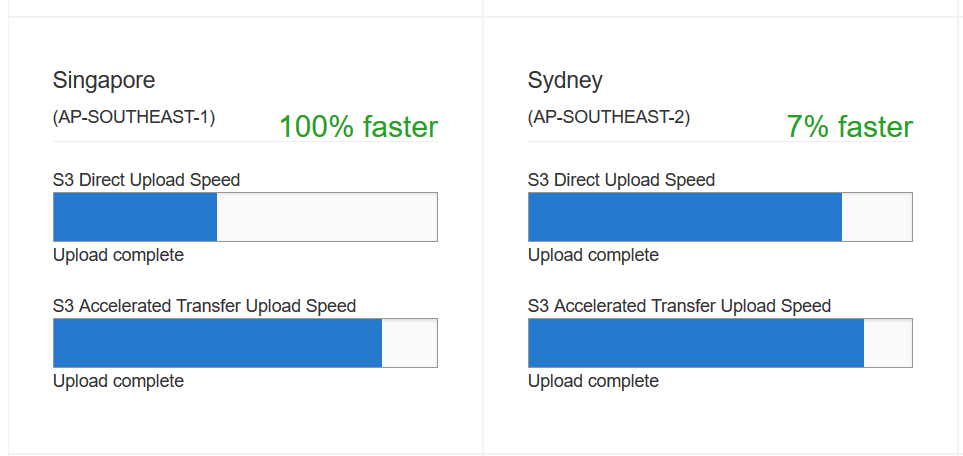
In addition, the ability to upload/send data to applications (Transfer Acceleration) on-Region via the Edge (Edge Upload) may now also make a difference; with 45 ms to Melbourne, its been a largely unused feature as the acceleration hadn’t made much of a difference. There is a Transfer Acceleration test tool that shows what effect this will give you; and right now, while it shows an advantage to Singapore, just a 7% increase in performance to the AWS Sydney Region. Its not clear if TA via the Perth PoP is enabled at this point, so prehaps this will change the result over time.

And so, after several years, and with other improvements like the ability to restrict HTTPS traffic to TLS 1.2, it now makes sense to me to use CloudFront for my personal blog. In an hour, I had applied a new (additional) hostname against my origin server (a Linux box running WordPress) by editing the Apache config, symlinking the wordpress config file, and adding a Route53 CNAME for the host. I had certbot on Linux then add the new name to the Let’s Encrypt certificate on the origin. Next I applied for an Amazon Certificate Manager SSL certificate, with the hostname blog, and (if you inspect it) blog-cloudfront.james.rcpt.to. I then created a Cloudfront Distribution, with one origin, but two behaviours – one for the WordPress admin path, and one for the default paths, so that I could apply additional rules to protect the administration interface.

With this in place I could then update the DNS CNAME to move traffic to CloudFront, without any downtime. Not that downtime matters on my personal blog, but doing exercises like this you need to practice.

Welcome to Perth, CloudFront.

PS: It’s worth noting that IPv4 DNS resolution for my CloudFront distribiution is giving me 4ms RTT from Perth, but IPv6 RTT is 52ms, which indicates that IPv6 CloudFront has not yet arrived here.